The $50,000 Mistake Roofing Contractors Make With Their Contact Forms
Most roofing contractors think their website is doing its job. The phone number is visible. The contact form works. Leads […]
Most roofing contractors think their website is doing its job.
The phone number is visible.
The contact form works.
Leads occasionally arrive.
Everything seems fine.
But what if your contact form is silently costing your business thousands of dollars every month?
Across the United States and Canada, roofing companies invest heavily in Google Ads, Facebook Ads, SEO, and Local Services Ads to drive traffic to their websites.
Unfortunately, many of those hard-earned visitors never become customers.
The reason is surprisingly simple.
Your contact form creates friction.
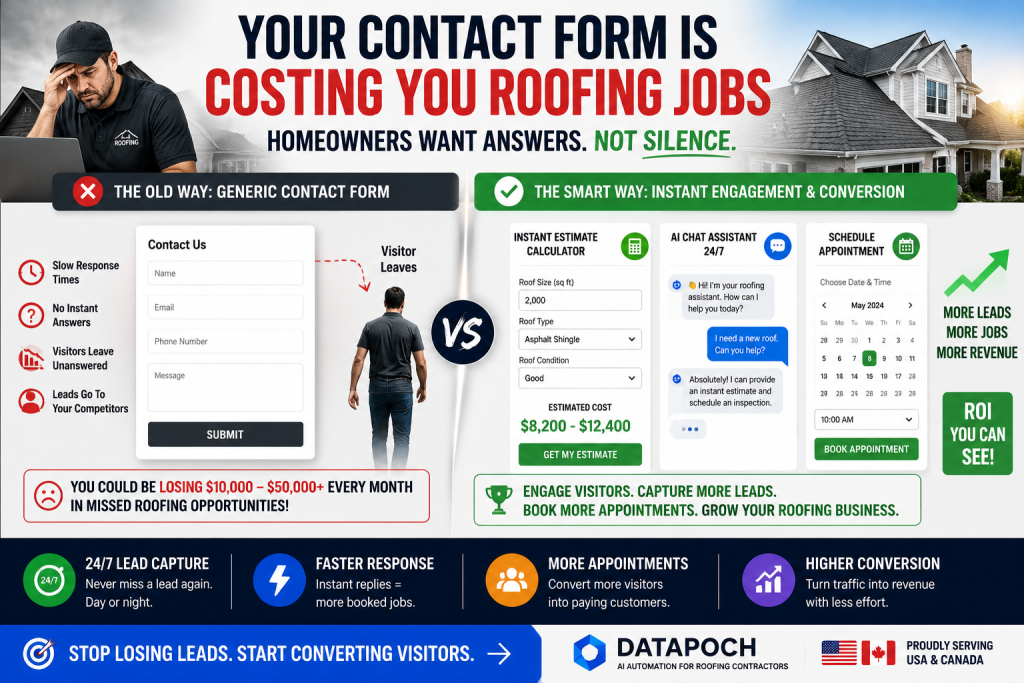
Why Traditional Roofing Contact Forms Fail
Most roofing websites use the same form:
- Name
- Phone Number
- Message
Then the visitor clicks Submit.
And waits.
Sometimes for hours.
Sometimes for days.
From the homeowner’s perspective, this creates uncertainty.
Questions immediately arise:
- Did my message go through?
- How much will my roof cost?
- When will someone contact me?
- Should I call another company?
Many homeowners don’t wait for answers.
They move on to competitors.
The Real Cost of Website Friction
Imagine your website receives:
- 500 visitors monthly
- 50 form submissions
- Average roofing project value: $15,000
Now imagine an improved experience increases conversions by only 10%.
That could mean several additional projects every month.
For many roofing companies, that’s tens of thousands of dollars in additional revenue annually.
Homeowners Want Instant Answers
Modern consumers expect:
- Instant estimates
- Fast communication
- Online scheduling
- Immediate confirmation
When a visitor lands on your website and finds only a generic contact form, they often leave disappointed.
What High-Converting Roofing Websites Do Differently
Successful roofing companies provide value before asking visitors to wait.
Examples include:
Instant Estimate Calculators
Allow homeowners to estimate project costs immediately.
AI Chat Assistants
Answer questions 24/7.
Appointment Booking
Enable visitors to schedule inspections online.
Automated Follow-Up
Confirm inquiries instantly.
These features improve trust and increase conversions.
Contact Form vs Modern Lead Capture
Traditional Contact Form
Visitor submits information.
Waits for response.
No engagement.
No pricing guidance.
No scheduling.
Modern Roofing Website
Visitor receives:
- Instant estimate
- Automated responses
- Appointment scheduling
- Helpful information
- Immediate engagement
The difference is dramatic.
Warning Signs Your Contact Form Is Costing You Leads
You may have a problem if:
- Website traffic is growing but leads are not.
- Visitors leave quickly.
- Many inquiries never answer callbacks.
- Leads choose competitors.
- Response times exceed one hour.
These signs often indicate conversion issues rather than traffic problems.
The Future of Roofing Lead Generation
Roofing companies that continue relying solely on contact forms will struggle to compete.
Homeowners increasingly expect fast, digital experiences.
Companies that embrace automation gain a significant advantage.
Final Thoughts
Traffic is expensive.
Whether visitors arrive through SEO, Google Ads, referrals, or social media, every click has value.
If your website sends visitors into a generic contact form and asks them to wait, you’re likely losing opportunities.
The most successful roofing companies focus not only on generating traffic but also on converting it.
Sometimes the biggest growth opportunity isn’t more visitors.
It’s improving what happens after they arrive.
Stop Losing Contractor Leads
Datapoch helps contractors in the USA and Canada capture more leads, automate follow-up, and book more appointments.
Get Free ConsultationFrequently Asked Questions
How can contractors get more leads from their website?
Contractors can improve results by adding faster response systems, clearer calls to action, instant estimate tools, AI chat, and automated follow-up.
Does this blog layout work with old posts?
Yes. Once the plugin is activated, it automatically applies the premium layout to existing and new single blog posts.
Is this plugin built for Astra Free?
Yes. It is designed to work with Astra Free and Classic Editor, but it should also work with most standard WordPress themes.